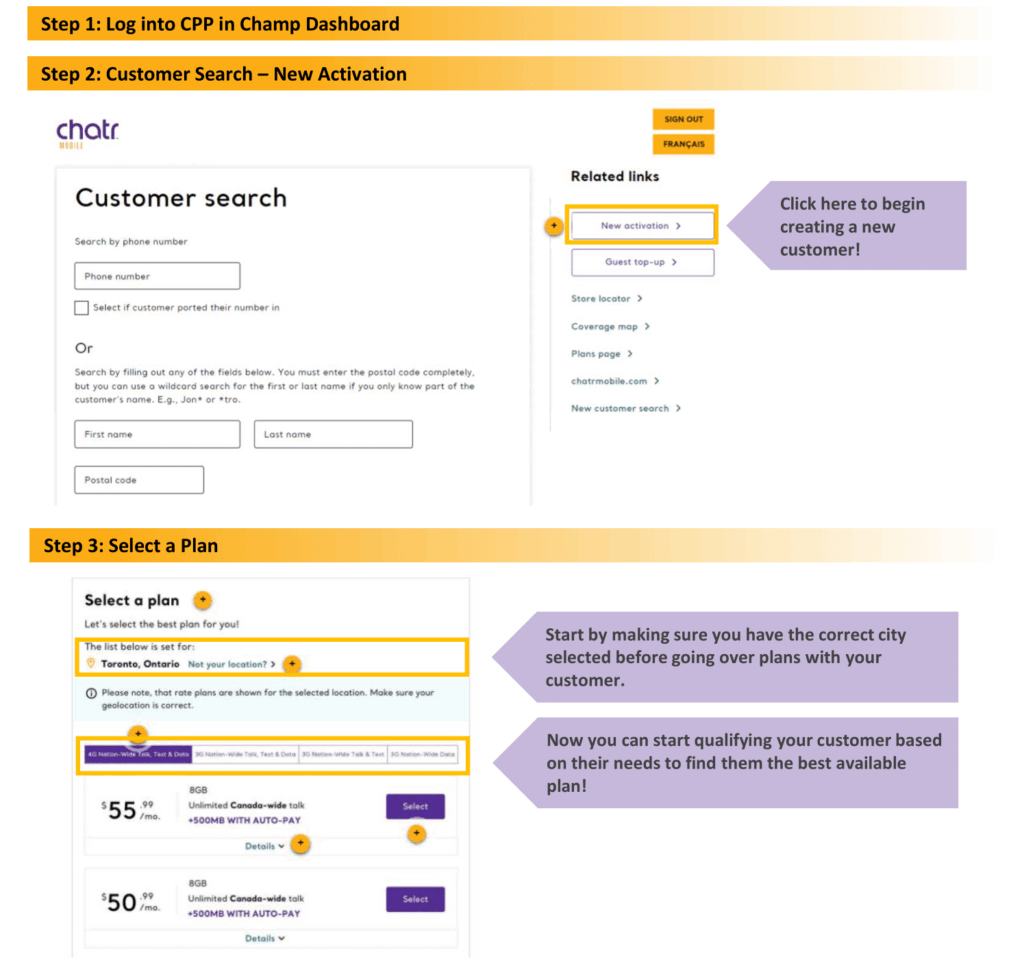
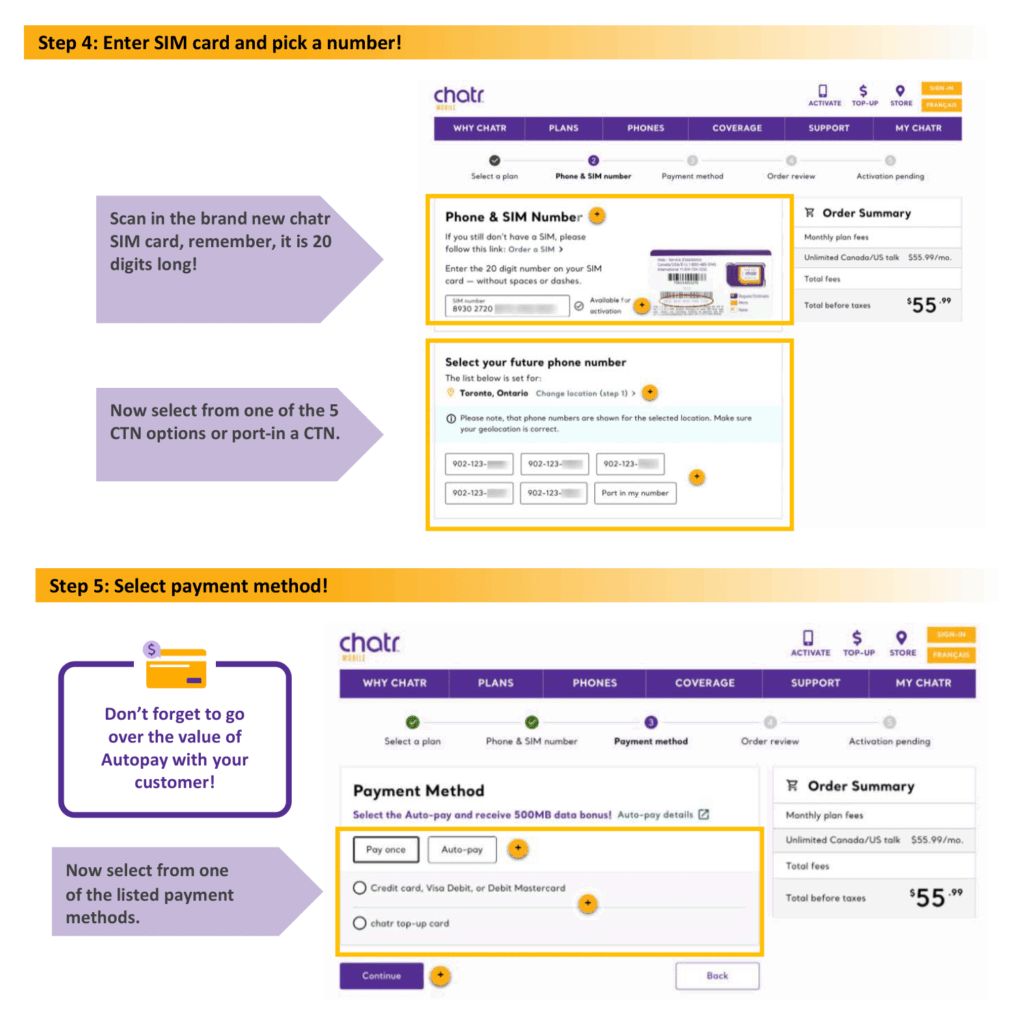
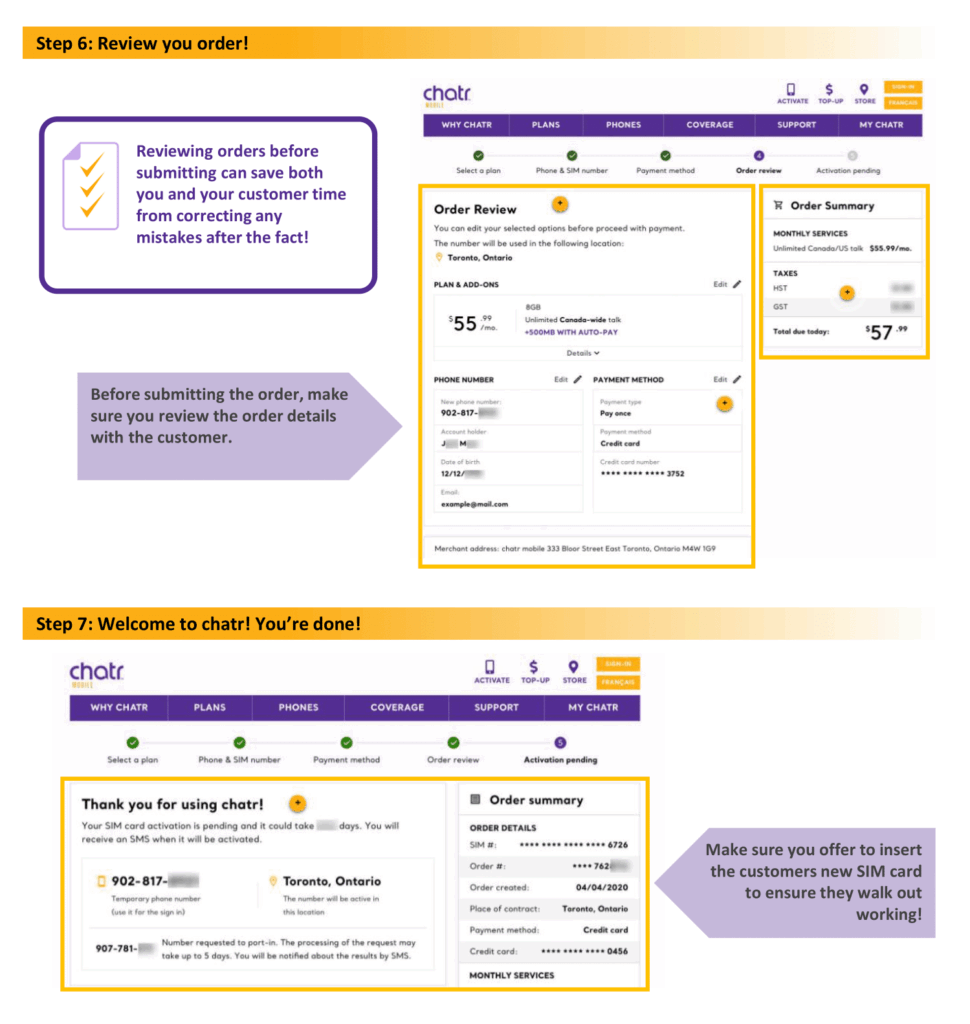
Once those fields have been completed, click ‘Next Step’
Step 2 - Choose a Number
In the City field, enter the closest city to your store’s location.
Click ‘Search’
Select one of the five numbers offered to you (blue check indicates selected)
Once your customer agrees to the number, click ‘Next Step’
Step 3 - Choose a Plan
To help your customer decide on a plan, show them the Plan Grid!
Expand the section of your customer’s chosen plan (3G or 4G)
Click ‘Add‘ on the desired plan. You should see the word grey-out once added
Review the plan details with your customer and ask them to confirm their choice
Once your customer agrees to the number, click ‘Next Step’
Step 4 - Extra Features
The main feature on this page is Auto Top-Up (highlighted yellow)
Auto Top-Up rewards customers with extra monthly data for providing a credit card on file. That credit card will be automatically charged the price of their plan every month.
If the customer wants Auto Top-Up, click ‘Add’
If the cusomer does not want Auto Top-Up, do not click anything
Once the above has been completed, click ‘Next Step’
Step 5 - Account Top-Up
Select Voucher as payment method
Print voucher(s) equal to the price of the plan
(You can print vouchers from Web Store, if you have an account!)
Enter the PINs of the vouchers under ‘Voucher Number’ (click the + if you have more than one to add)
Click ‘Validated’ to ensure the PINs are valid
Once the vouchers have been validated, click ‘Next Step’
Step 6 - Account Summary
Review the plan
If all looks good, click ‘Submit – Electronic Signature’
Customer signature on agreement
Sign digitally or click ‘Skip and Print’ for a physical copy
Final review
Check all the boxes, then click ‘Confirm’
Step 7 - Activate the eSIM
Scan this QR code using the Camera app on the client’s phone and complete the prompts that appear to finish activating the eSIM.
Frequently Asked Questions
Login Errors
When I log in I get the 'Oops' error. How do I fix this?
If the issue persists, please contact us for assistance.
When I log in I get the 'Account Locked' error. How do I fix this?
There are two reasons your account may be locked…
You have tried logging in with the wrong password 3 times.
Your password has passed it’s expiry date without being reset.
In both of these cases, you will need to contact us for a new password.
I've gotten a new PC or swapped the hard drive on my old one - why can't I login
Every PC you would like to access the Lucky portal from will need to be licensed separately for us.
Please contact us to request a new license.
Account
How do I reset my password?
Watch this video demonstration to see how to change your Lucky portal password
I'm running low on SIMs - how do I order more?
We normally keep track of your on hand inventory by subtracting the amount you’ve activated by the amount we’ve shipped you, and will automatically send you replenishment orders when your balance is low.
If for some reason your inventory runs low, please submit a request using our Order SIMs form.
I have a PC activation code - how do I register my PC?
If you have not received an authorization code, please contact us.
Billing Inquires
When will I receive my commissions?
Commissions for activations are paid out by the month, arriving in your account ~45 days after the month of activation.
For example, you would receive your commission payment for all activations in the month of January on (or around) March 15th.
Why am I seeing adjustments on my statements?
If a new customer does not Top-Up for a second month, or is ported out within the first 30 days, the value of the account will be subtracted from your statement.
To prevent this, avoid porting over your Lucky Mobile customers.
Quick links
One View: Activation Portal
WebStore: TopUp Vouchers
FastAct: Backup Activation
Order SIMs
Need HElp?
Chat Now
Andre Charlebois Program Manager [Cell] (416) 710-8897 simdealersupport@nowprepay.ca
Will Ivens Program Specialist [Cell] (647) 327-4576 simdealersupport@nowprepay.ca